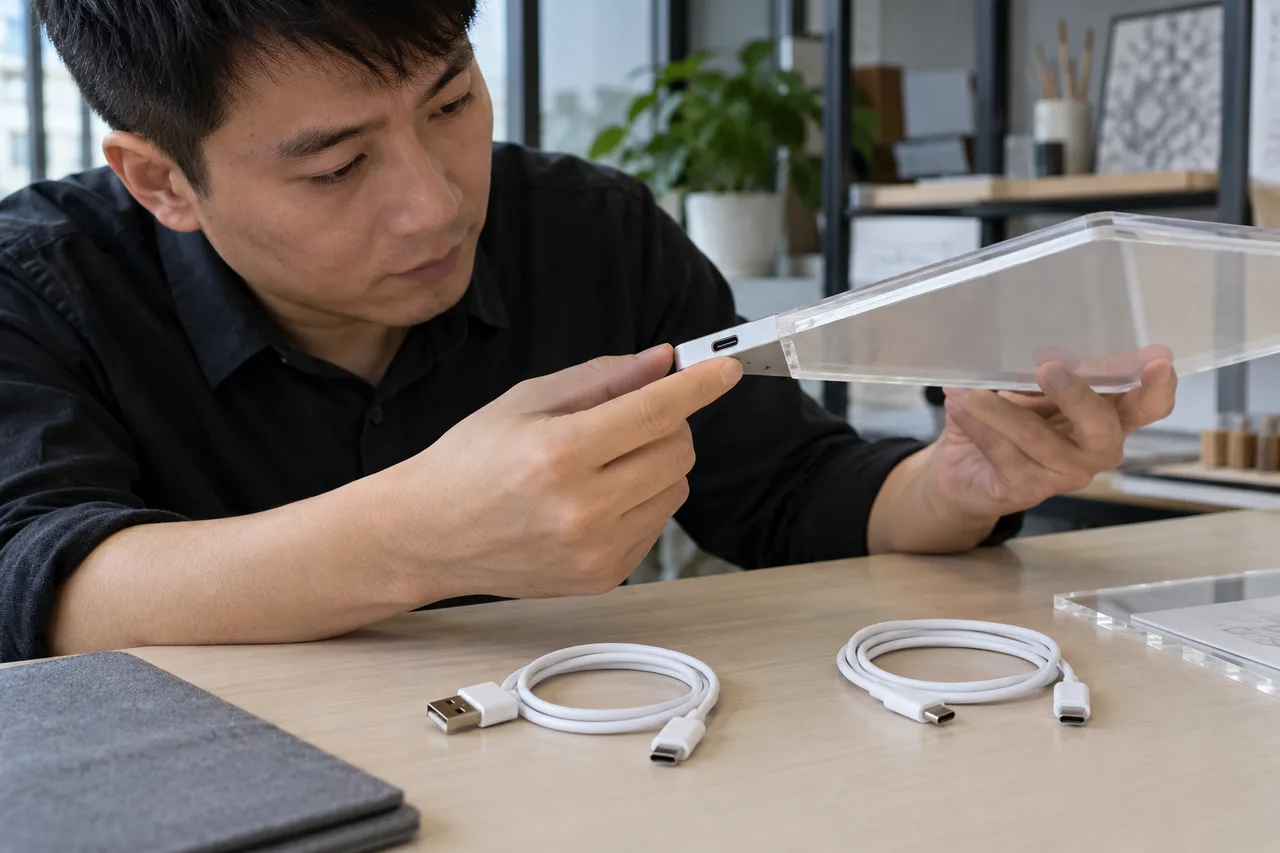
Specify the implementation behind the connector
USB-C identifies a connector system; USB Power Delivery is a separate power protocol. A USB-C drawing board is not automatically rechargeable or compatible with every source and cable arrangement. Ask for the model's rated input, supported power behavior, exact cable, source requirements, and supplied contents, then review the complete setup on a sample.
1. Distinguish connector shape from power protocol
USB-C describes a connector system, while USB Power Delivery describes a separate protocol and hardware capability. The terms should appear separately in a product specification and quotation.
The USB-IF packaging guidance explicitly distinguishes USB Type-C from USB Power Delivery and other USB capabilities. For a buyer, this means that seeing a reversible socket on a board does not establish which power behavior is implemented. Ask the manufacturer to state supported input and source requirements for the actual model. Avoid using a phone charger or cable photograph as the only technical description.
A quotation should identify the board-side connector, source-side connector, cable length and type, input rating, and any supported protocol. If a feature has not been confirmed, record it as unconfirmed. Do not add USB PD, fast charging, data transfer, or universal compatibility to a product listing merely because the port resembles one on a different device. A modest but accurate feature list is easier for importers and customers to use.
A useful supplier reply can say that a model has a Type-C input and then specify exactly what operating arrangement it supports. If the reply instead lists a long family of USB names without ratings or implementation details, ask for clarification. The buyer needs the actual product behavior and supported use, not the maximum capability of every technology that can use a similar connector.
- Record connector and protocol in separate fields.
- Ask for the actual model's input specification.
- Keep unverified capabilities out of pack and listing claims.
2. Separate USB operation from rechargeable operation
A board can operate from USB without containing a rechargeable battery. Charging claims require a battery and charging implementation that the supplier has actually specified for the offered model.
Ask a direct question: does the quoted unit contain a battery, and if so what chemistry, capacity information, access arrangement, and charging system are supplied? If the unit works only while connected to an external source, describe it as USB powered if that is the confirmed arrangement. Do not imply portable untethered operation from the presence of a USB cable. Photographs often omit the source, so review the full setup rather than assuming what is inside the base.
A rechargeable alternative can change the bill of materials, care instructions, transport classification, local compliance review, support questions, and price basis. Treat it as a separate configuration until the supplier confirms otherwise. Ask whether a quoted sample and the eventual production order contain the same power parts. This distinction also prevents a replacement-base order from quietly introducing a battery feature the original retail pack never described.
Place the battery-status answer in the retail contents sheet as well as the technical file. A sales team can otherwise describe a wired board as rechargeable after seeing a cable in a product photo. Review words such as portable, cordless, charging, and power bank against the confirmed model. They can imply different customer expectations even when the packaging team considers them harmless promotional shorthand.
- Confirm whether any battery is installed or supplied.
- Describe tethered and untethered operation accurately.
- Review battery variants as specific configurations.
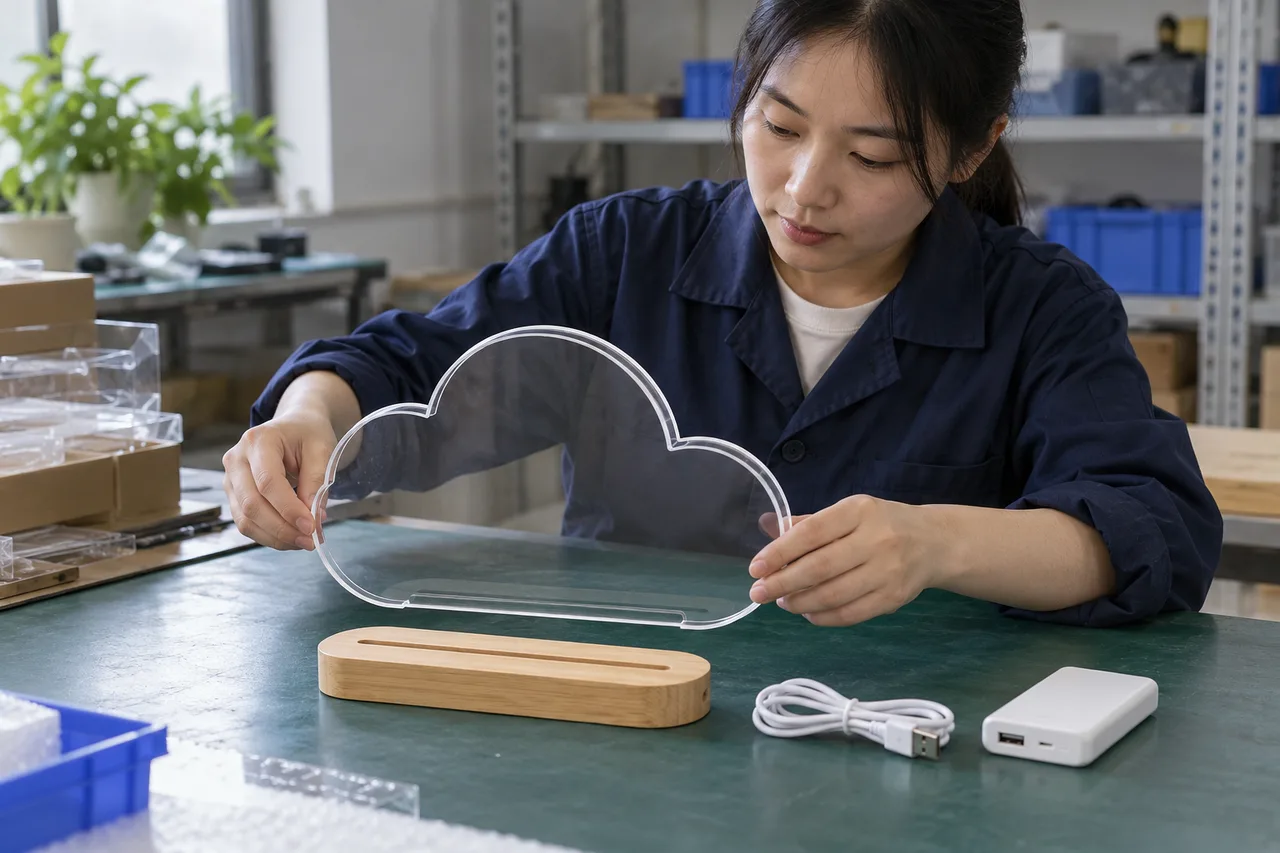
3. Identify source and cable combinations separately
An A-to-C cable and a C-to-C cable are different configurations. Confirm which complete arrangements the product is designed to support, then review the proposed retail arrangement without experimenting beyond its specification.
Review the complete power path
A purchasing team may receive a sample using one cable and later choose another for packaging convenience. That change should trigger an engineering review of the intended source and input implementation. Ask the supplier to identify the supported cable arrangement in writing. If the buyer needs operation with a particular compliant source type, include that requirement before sample approval rather than discovering the question during warehouse receiving.
A functional sample review should use the specified source and cable, verify their identities, and follow the operating instructions. Record whether the sample powers and responds normally in that setup. A brief operation check does not certify the electrical design or prove compatibility with every charger. If the supplier claims multiple supported combinations, ask for an appropriate engineering basis and test scope, then keep the combinations separately identified in the sample record.
If C-to-C operation is required by a retailer, state it before ordering the sample and have the manufacturer confirm support through appropriate technical review. Do not assume that the factory's sample using an A-to-C cable resolves that requirement. Keep the requested source and cable combination identifiable in the approval record so a later packaging change does not silently remove a feature the retailer expected.
- Name both ends of the included cable.
- Obtain supported source requirements before checking operation.
- Escalate a cable substitution for review before production.
4. Write a power table that a factory can answer
A useful power table identifies the board, required input, connector, supported cable, external source, battery status, and included parts. It makes unknowns and optional accessories visible.
Use one row for each offered SKU and power version. Request product rating information from a controlled specification or label, and ask the supplier to distinguish maximum source capability from the board's input. Add separate columns for included, optional, and buyer supplied. If a wall adapter is offered, identify its model and destination configuration; a USB connection does not by itself determine the local plug or adapter requirements.
Keep the table with the quotation and approved sample. Procurement, quality, packaging, and support teams should use the same version. When a supplier proposes a new cable or source, update the row and ask which engineering, regulatory, packaging, and user-information records need review. This is especially useful for multi-country orders, where a board can share its core design but have different power accessories or customer instructions.
For a configuration reference, use the USB Portable LED Fluorescent Board and ask for its current supplied arrangement. A product name containing USB or portable should lead to a factual enquiry, not a conclusion about PD or battery operation. The supplier's written response and sample record should identify which parts are included and what requirements remain open for the project.
- Use one record per board and power version.
- Distinguish included, optional, and buyer-supplied parts.
- Link specifications to the quotation and sample.
| Specification field | Required clarification |
|---|---|
| Board input | Rating and source requirements for this model |
| Cable | Connector at each end and confirmed included version |
| External source | Included, optional, or buyer supplied |
| Battery | Absent, replaceable, or specified rechargeable arrangement |
5. Review operation and physical fit with a controlled sample
Sample review should identify the power setup and observe normal use, connection fit, control response, and packaging. Any abnormal heat, damage, or intermittent operation should be recorded and referred to the responsible technical party.
Begin with visual identity: the board and base code, connector position, supplied cable, any rating label, and package contents. Follow the supplier's normal setup sequence. Observe whether the cable fits as intended, whether the base remains properly supported, and whether the control functions respond in the specified modes. State the duration and conditions of the check rather than using vague descriptions such as tested for reliability.
If a symptom occurs, preserve the sample and record its setup before making changes. Repeatedly swapping sources or forcing a connector can obscure the original observation and may exceed the intended use. Ask the manufacturer or qualified electrical specialist to investigate. Procurement should not invent electrical acceptance limits or conduct improvised stress tests. The purpose of the sample stage is to establish the offered configuration and route technical questions appropriately.
Record a functional symptom before changing the setup. For example, write that a named sample did not illuminate under a specified supported arrangement, then preserve its cable and source references. This is an example of reporting format, not an actual finding. A technical investigator can then distinguish component identity, connection, and product behavior without relying on a vague statement that the board does not work.
- Record sample identity and operating setup.
- Use only the supported power arrangement.
- Preserve and escalate unexpected behavior.
6. Keep packaging language aligned with confirmed capability
Use accurate terms for connector, power, charging, and included accessories. USB-IF guidance recommends stating supported protocols clearly; a logo or familiar connector should not imply capabilities the model does not have.
Have the packaging reviewer read the power section as a new customer would. Does USB cable included sound like an adapter is included? Does rechargeable imply untethered operation? Does works with USB-C imply the particular source arrangement the customer is likely to use? Resolve ambiguity with precise language and an honest contents diagram. Any certification or USB trademark claim needs authorization and substantiation for the exact implementation.
The USB-IF Power Delivery overview explains the protocol's general capability, but those capabilities should not be copied onto a small board's specification. Include only confirmed features. Align the carton, quick-start insert, website, marketplace attributes, and support response. A power-accessory photograph should be labeled optional if the accessory is not supplied, and a source hidden outside a lifestyle image should not create a misleading impression of battery operation.
A contents photograph should show the exact cable and any included adapter, while optional accessories should be clearly described. If several destination packs exist, use separate image and artwork references. This prevents a global catalogue image from implying a local mains adapter is supplied everywhere. Ask the responsible market reviewer to confirm any adapter markings and instructions required for the destination arrangement.
- Use precise supplied-item descriptions.
- Review customer interpretation of charging and compatibility claims.
- Verify trademark and certification language before use.
7. Control substitutions and shipment records
Treat changes to connectors, cables, power sources, and battery arrangements as product changes requiring review. Shipment inspection should compare the released configuration with the order and sample.
Add a power-change notification requirement to the purchase file. The supplier should identify the original component, proposed replacement, reason, product effect, and evidence available. The buyer can then route the proposal to engineering and destination-market reviewers as appropriate. A cable that looks similar can still have a different construction or capability, so approval should rely on the required specification rather than appearance alone.
At shipment inspection, check the model and power configuration, cable quantity and type, relevant labels, package contents, and agreed normal-operation observations. Identify the sampled units and report findings. Such an inspection does not replace electrical conformity assessment or establish universal compatibility. Keep the power-adapter procurement guide and the destination plug plan available for the additional accessory questions.
Cable substitutions should include a reason, old and new references, relevant specifications, and the evidence used to approve the change. A shipment inspector may be able to check connector form and labeling, but cannot infer internal construction from appearance. Agree what documentary and functional checks are practical and make the approval owner explicit. Keep the record with the affected production order and packing revision.
- Require notice of power-component changes.
- Review substitutions before they reach production.
- Match shipment contents to the approved power table.
8. Conclusion: buy a documented power configuration
The right buying unit is the board plus its confirmed input, cable, source arrangement, battery status, and instructions. A connector name alone leaves too many important customer questions unanswered.
A clear USB specification improves quote comparison, sample approval, packaging, and after-sales communication. It can also reduce avoidable variation across orders when purchasing changes a cable for cost or availability. Ask suppliers to identify unknowns openly and plan a suitable technical review where evidence is missing. The buyer's task is to define required use and obtain a supported configuration, not to infer implementation from another device's behavior.
For a LumDigi project, share the intended sales market, board model or shape, preferred power arrangement, whether a source should be included, and any particular supported cable requirement. LumDigi can confirm the offered configuration and sample details. If rechargeable operation or USB PD is essential, state that explicitly and request written confirmation rather than assuming it from the product's port.
Support staff should have a concise, approved explanation of the model's power requirements and the supplied items. The explanation should avoid telling a customer to try arbitrary sources or bypass a damaged connector. Where behavior is unexpected, collect product and setup facts and refer the issue to the appropriate technical channel. Clear specifications improve both purchasing and after-sales communication without claiming compatibility beyond the evidence.
- Specify connector, protocol, battery, and contents separately.
- Approve the complete sample arrangement.
- Carry the same power record through production and listing.
Frequently asked questions
Does a USB-C port mean an LED board supports USB Power Delivery?
No. USB Type-C and USB Power Delivery are separate capabilities. Request the actual model's input and supported power behavior from the manufacturer. Do not use the connector shape as evidence of PD, fast charging, data transfer, or compatibility with every source.
Is every USB-powered drawing board rechargeable?
No. A product can operate from an external USB source without containing a rechargeable battery. Confirm whether a battery is installed, what operation is supported without a cable, and which charging components exist before using rechargeable language in a quote or listing.
What should the factory confirm about the included cable?
Ask for the connector at each end, cable specification, supported source arrangement, included length, model or reference, and any relevant operating limitations. Review the complete setup on a sample, and require notice before the supplier substitutes the cable or changes the board's input implementation.
Image planning for this topic
These notes document the role and intended context of the two visuals used in this guide.
Show connector and cable identification
- Placement
- hero
- Caption
- Illustrative AI-generated photograph: a buyer compares a board’s USB-C port and proposed cable without inferring unsupported capabilities.
- ALT text
- Adult buyer inspecting a USB-C port on an acrylic LED drawing board base
View AI image direction
Use case: photorealistic-natural. Asset type: editorial image for a LumDigi B2B LED drawing board article. Close documentary photograph of an adult Chinese buyer inspecting the USB-C connector on a slim LED acrylic drawing board base. A USB-A to USB-C cable and a USB-C to USB-C cable lie separately on a clean desk, clearly plausible connector forms, no lit test display or readable labels. Landscape 3:2, real acrylic textures, modest natural light, candid professional photography. If workers appear, they are Chinese/Asian adults. No invented logos, certification marks, readable documents, numerical test results, watermark, or text overlay. Show an illustrative procurement or sample-review scene, not proof of an actual test or shipment.
Show complete configuration review
- Placement
- after-second-section
- Caption
- Illustrative AI-generated photograph: a sample technician prepares the board, cable, and separate source as a documented set.
- ALT text
- Chinese technician preparing an LED drawing board USB cable and separate power source
View AI image direction
Use case: photorealistic-natural. Asset type: editorial image for a LumDigi B2B LED drawing board article. An adult Chinese factory sample technician lays out a cloud-shaped transparent LED board, its base, a USB cable, and a plain external power source on a practical bench. Show a controlled product review with no hands touching live internal electronics and no numerical results. Landscape 3:2, real acrylic textures, modest natural light, candid professional photography. If workers appear, they are Chinese/Asian adults. No invented logos, certification marks, readable documents, numerical test results, watermark, or text overlay. Show an illustrative procurement or sample-review scene, not proof of an actual test or shipment.
Turn the article into a practical sourcing brief
Use the checkpoints above to document the product, evidence, packaging, and approval decisions relevant to your market. A clear brief helps suppliers respond to the same commercial question and gives your team a traceable basis for the next step.
Useful external references
- USB-IF: USB Type-C language and packaging guidance
Official distinction between the Type-C connector and protocols such as USB Power Delivery.
- USB-IF: USB Charger and Power Delivery
Official overview of USB Power Delivery capabilities and implementation.
LED Drawing Board USB Power and Cable Sourcing Guide
A practical buyer guide for importers, private-label buyers, and product teams who need to select the power arrangement and supplied cable around the approved board, base, destination, channel, sample, and packed set.
Read article
LED Drawing Board Power Adapter Procurement Guide
A B2B buying guide for product developers, importers, and retail buyers who need to define the supplied power arrangement from the approved board, base, connector, cable, and destination context.
Read articleLED Drawing Board Destination Plug Planning Guide
A B2B buying guide for importers, technical buyers, and private-label brands who need to define the proposed power accessory arrangement for the selected board and destination context.
Read article
Can Alcohol Clean an Acrylic LED Drawing Board? A Buyer Guide to Cleaner Approval and Crazing
A care-instruction and sample-review guide for importers investigating haze, fine cracks, and unsupported cleaning recommendations.
Read article